
How to redeem an Amenity voucher
Do you have an Amenity voucher and want to use it for a stay? Make your reservation as usual in our booking system. Simply choose the correct payment rate and enter the voucher number in the booking notes.
Before you start
1
Choose a resort and date
Select where and when you would like to stay.
2
Choose payment by bank transfer
To redeem a voucher, select the “payment by bank transfer” rate only.
3
Have your voucher number ready
You will find it directly on your purchased voucher.
Redeem your voucher step by step
The whole process only takes a few minutes.
1
Choose a resort and stay dates
In the Amenity booking system, choose your preferred resort and stay dates. To redeem the voucher, select the “payment by bank transfer” rate only.
2
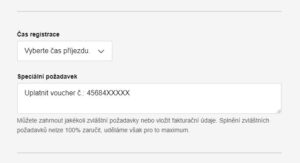
Enter the voucher number in the booking notes
In the final booking step, when filling in your contact details, enter in the “Your special requests” field that you would like to redeem a previously purchased voucher and include the voucher number.
3
Wait for the adjusted payment request
The reception team will process your reservation and send you a payment request with the voucher value deducted.
4
Make the payment
Pay the remaining amount shown in the payment request sent by the reception team.
5
Enjoy your stay
Your voucher has been applied and you can look forward to your stay at Amenity.
Don’t have a voucher yet?
Explore our Amenity gift vouchers. Choose a value voucher with your preferred amount or a discounted voucher with a specific stay package.